- Inbound or Outbound process which undergoes multiple process steps from one stage to another is termed as POSC
- POSC is primarily used to make complex type of putaways or picking.
- POSC only works with Handling Units, so it is required to pack the product once they arrive in warehouse or it should automatically create HU when receive in warehouse.
- Once product is received in warehouse, it is subject to below process steps for Put-away
- Unload
- Count
- Deconsolidation
- Quality inspection
- Value Added Services (VAS)
- Packing
- Outbound process (Stock removal) steps include Picking, Packing, VAS, Staging, and Loading.
Process Oriented Storage Control for Deconsolidation

| Putaway | SAP Example | SAP Example | Our Config | Our Config |
| Final Storage Type | 0020 | 0050 | 1111 | 2222 |
| Putaway Strategy | 0020 | 0050 | 1111 | 2222 |
| SType Search Seq | 0020 | 0050 | 1111 | 2222 |
| Styp | 0020 | 0050 | 1111 | 2222 |
| Activity Area | 0020 | 0050 | 1111 | 2222 |
| Consolidation Gr | 10001 | 10006 | 0000000001 | 0000000002 |
| Step 1. | Define Process Oriented Storage Control DECO |
| IMG | SCM Extended Warehouse Management- EWM-Cross Process Settings–Warehouse Task-Define Process-Oriented Storage Control |
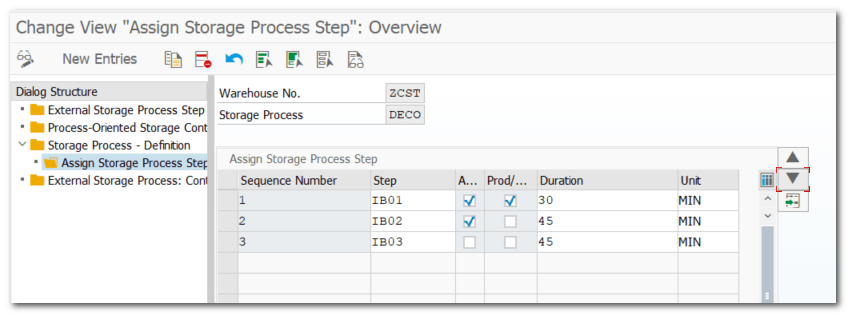
| Step 2. | Define Warehouse Process Type with Process Type as ZDEC |
| Assign Storage Process to WPT – DECO (Step 1.) | |
| IMG | SCM Extended Warehouse Management- EWM-Cross Process Settings–Warehouse Task-Define Warehouse Process Type |
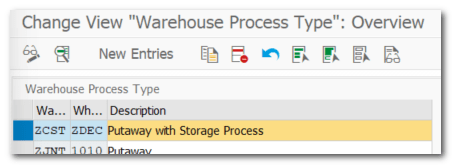
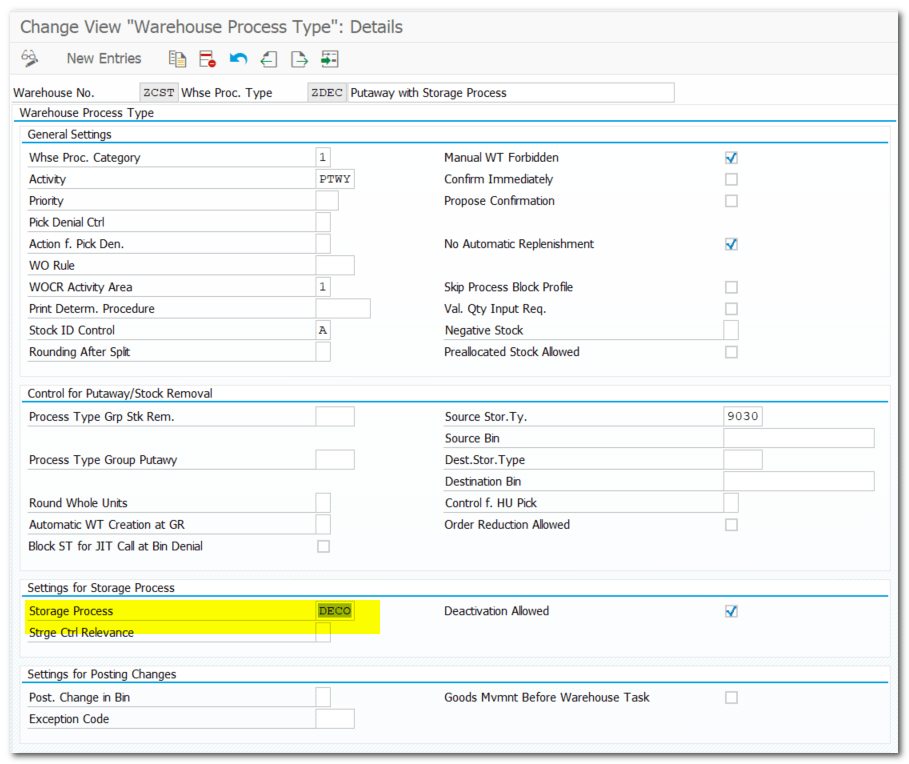
| Step 2.1. | Assign Source Bin to Warehouse Process Type |
| Pre-requisite | Create Storage Type for GR (Step 7) Create Storage BIN (Trans /n/scwm/ls01 Rule- Storage Type should have atleast 1 BIN |
| IMG | SCM Extended Warehouse Management- EWM-Cross Process Settings-Warehouse Task- Define Warehouse Process Type |

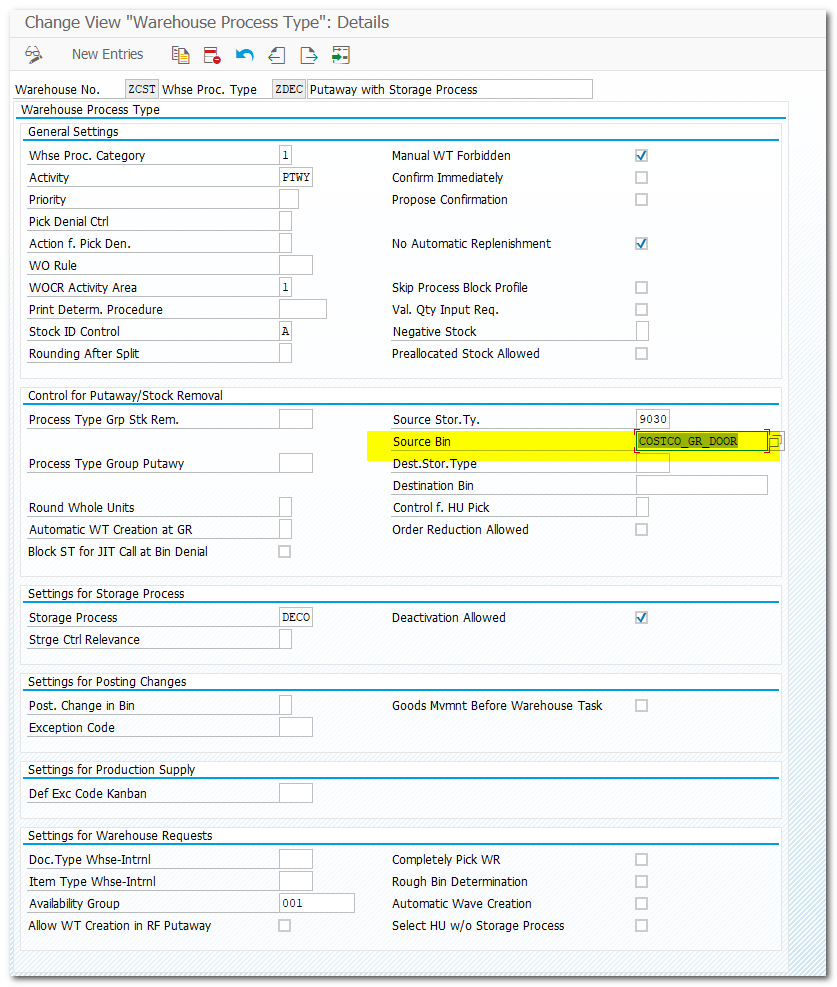
| Step 3. | Define Control Indicators for Determining Warehouse Process Type (ZDEC) |
| IMG | SCM Extended Warehouse Management- EWM-Cross Process Settings–Warehouse Task-Define Control Indicators for Determining Warehouse Process Types |
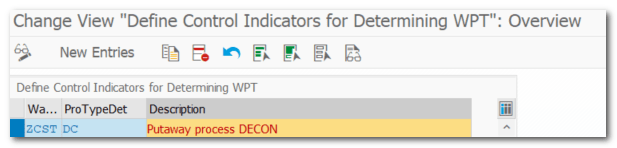
| Step 4. | Determination of Warehouse Process Type (ZDEC) |
| Pre-requisite – Step 3. Pre-requisite – Step 2. | |
| IMG | SCM Extended Warehouse Management- EWM-Cross Process Settings–Determine Warehouse Process Type |

| Step 5 | Define Final Storage Type |
| IMG | SCM Extended Warehouse Management- EWM-Master Data- Define Storage Type |

| Step 5.1. | Define Storage Type Search Sequence for Put-away |
| IMG | SCM Extended Warehouse Management- EWM-GR Process-Strategies-Storage Type Search- Define Storage Type Search Sequence for Put-away |

| Step 5.2. | Assign Storage Types to Storage Type Search Sequence |
| IMG | SCM Extended Warehouse Management- EWM-GR Proce Strategies-Storage Type Search- Assign Storage Types to Storage Type Search Sequence |

| Step 5.3. | Define Put-away Control Indicator |
| IMG | SCM Extended Warehouse Management- EWM-GR ProceStrategies-Storage Type Search- Define Putaway Control Indicator |
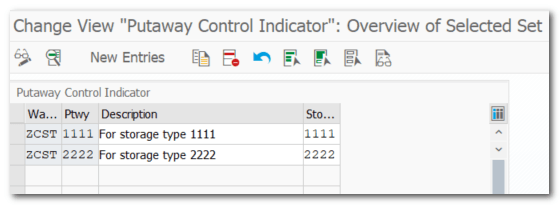
| Step 5.4. | Specify Storage Type Search Sequence for Put-away |
| IMG | SCM Extended Warehouse Management- EWM-GR ProceStrategies-Storage Type Search-Specify Storage Type Search Sequence for Put-away |
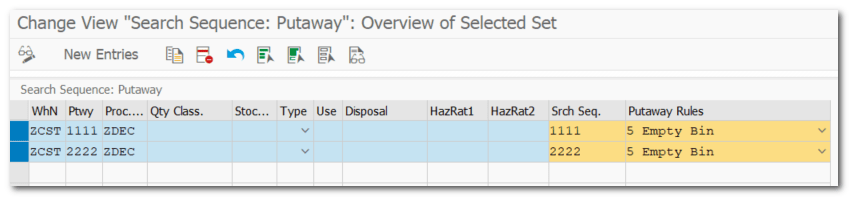
| Step 5.5. | Definen Activity Area |
| IMG | SCM Extended Warehouse Management- EWM-Master Data- Activity Area-Define Activity Area |

| Step 5.6. | Assign Storage Type to Activity Area |
| IMG | SCM Extended Warehouse Management- EWM-Master Data- Activity Area-Assign Storage Bins to Activity Areas |
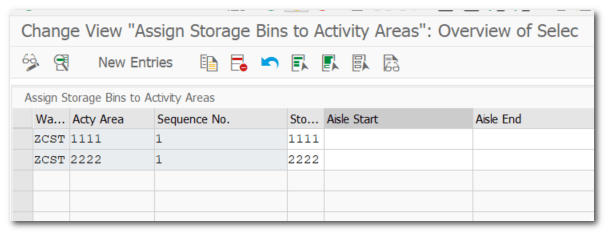
| Step 5.7. | Assign Number Range Intervals to Consolidation Groups |
| IMG | SCM Extended Warehouse Management- EWM-GR Process-Deconsolidation- Assign Number Range Intervals to Consolidation Groups |
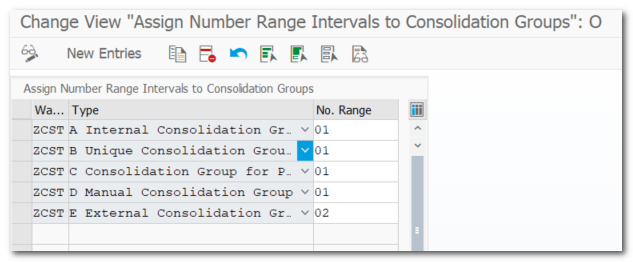
| Step 5.8. | Generate number by clicking on Pull Deconsolidation Group |
| IMG | SCM Extended Warehouse Management- EWM-Master Data- Activity Area-DAssign Storage Bins to Activity Areas |


| Step 5.9. | Define Sort Sequence for Activity Areas |
| IMG | SCM Extended Warehouse Management- EWM-Master Data-Activity Area- Define Sort Sequence for Activity Areas |

| Step 5.10. | Define Storage Bin Structure |
| IMG | SCM Extended Warehouse Management- EWM-Master Data-Storage Bins- Define Storage Bin Structure |
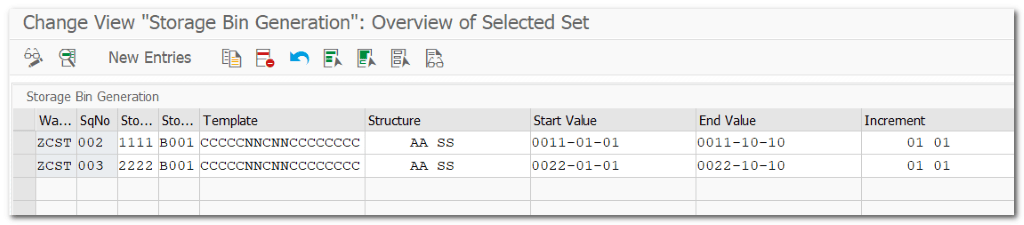
| Step 5.11. | Mass Create Storage BINs |
| TCODE | /n/scwm/ls10 |
Select, Display->Create and Save
| Step 5.12. | BIN Sorting for Activity Area 1111 and 2222 |
| TCODE | /n/scwm/sbst |

Step 6. Master Data Assignments
| Step 6.1. | Assign Control Indicator for Process Type Determination |
| TCODE | /N/SCWM/MAT1 |
Pre-req Material Created in MM
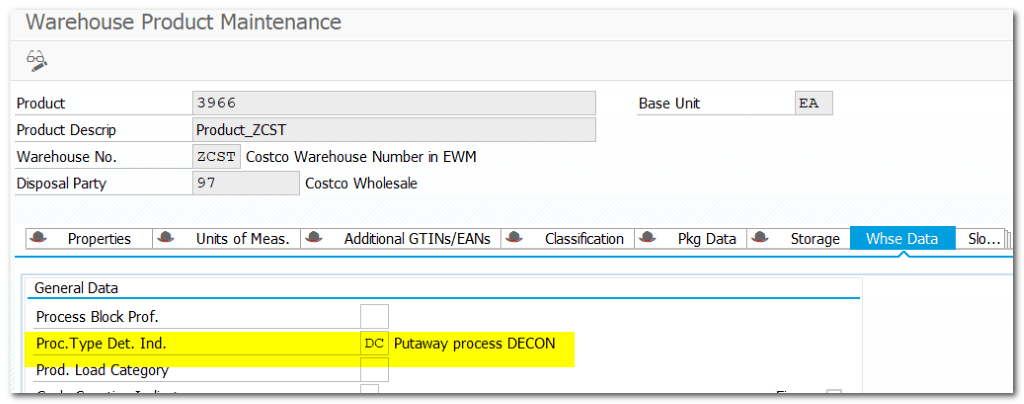

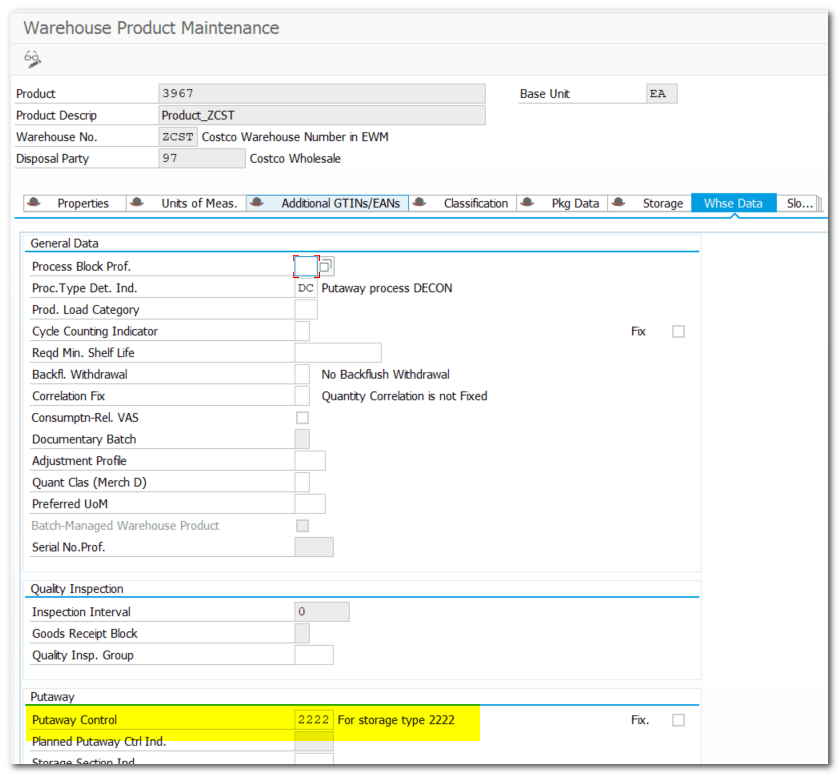
| Step 6.2. | Assign Put-away Indicator in Product Master |
/n/scwm/mat1
Product 3966

Product 3967
| Step 7. | Define Storage Type (Door) for GR |
| IMG | SCM Extended Warehouse Management- EWM-Master Data- Define Storage Type Storage Type Role – F(Doors) |

| Step 8. | Define Storage Type for Deconsolidation work center |
| IMG | SCM Extended Warehouse Management- EWM-Master Data – Define Storage Type Storage Type Role – E (Work Center) |

| Step 8.1. | Create BIN for Deconsolidation Storage Type (8010) |
| TCODE | /n/scwm/ls01 |
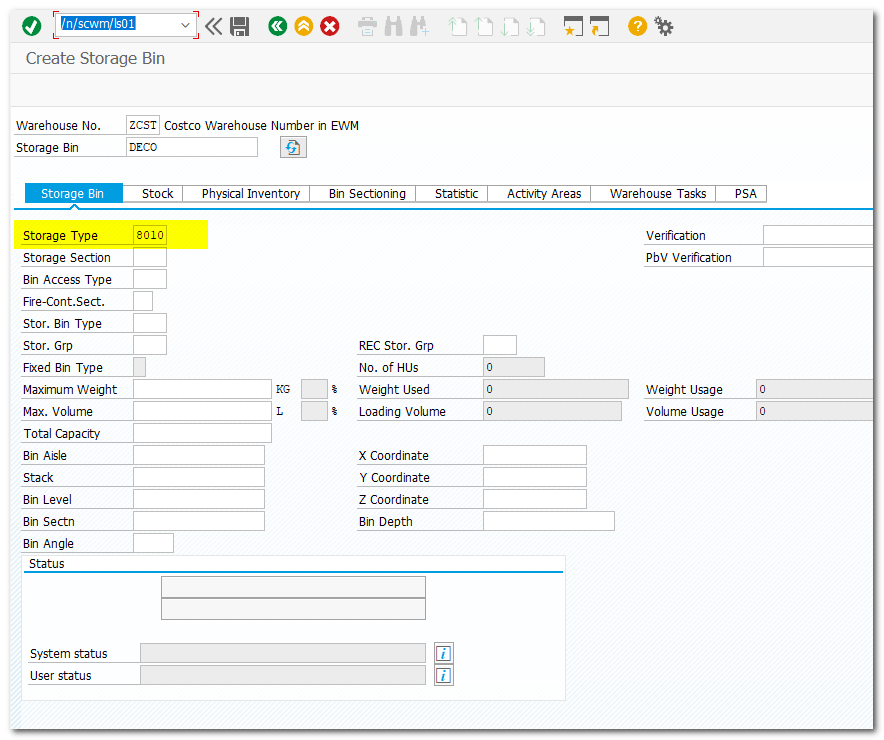
| Step 9. | Specify Work Center Layout |
| IMG | SCM Extended Warehouse Management- EWM-Master Data – Work Center-Specify Work Center Layout |

| Step 9.1 | Define Work Center |
| IMG | SCM Extended Warehouse Management- EWM-Master Data – Work Center-Define Work Center Assign Work Center Layout (Step 9) Assign Storage Type 8010 (Step 8) Assign Repack WPT 3040 |
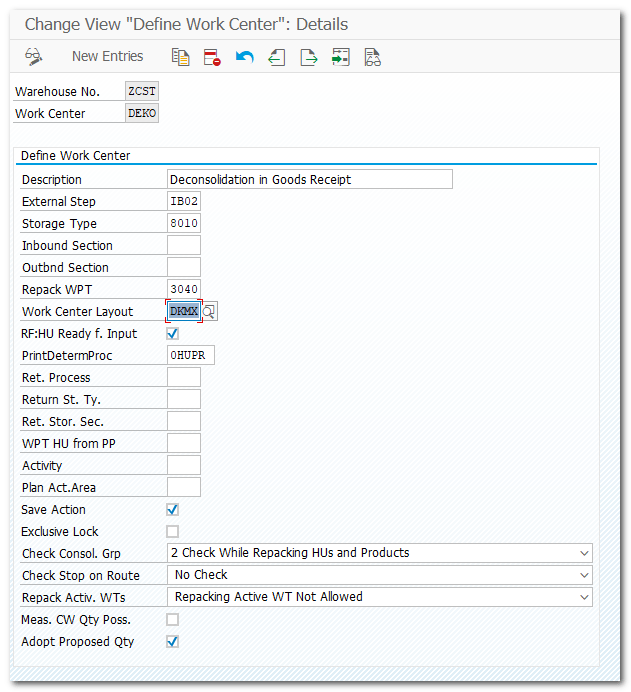
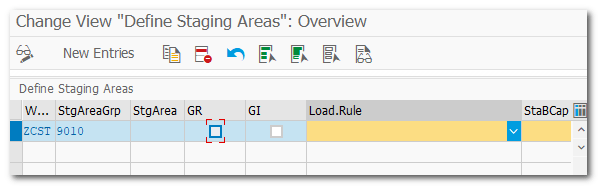
| Step 10. | Define Staging Area |
| IMG | SCM Extended Warehouse Management- EWM-Master Data –Staging Area-Define Staging Area |
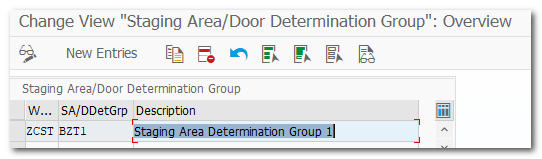
| Step 10.1. | Define Staging Area and Door Determination Groups |
| IMG | SCM Extended Warehouse Management- EWM-Master Data-Staging Area-Define Staging Area and Door Determination Groups |
| Step 10.2. | Create Warehouse Door |
| IMG | SCM Extended Warehouse Management- EWM-Master Data- Warehouse Door-Define Warehouse door |

| Step 10.3. | Assign Staging Area/Door Determination Group to Door |
| IMG | SCM Extended Warehouse Management- EWM-Master Data-Warehouse Door-Assign Staging Area/Door Determination Group to Door |
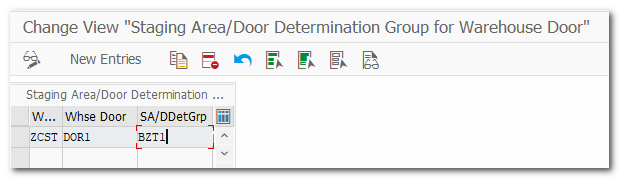
| Step 10.4. | Assign Staging Area to Warehouse Door |
| IMG | SCM Extended Warehouse Management- EWM-Master Data-Warehouse Door-Assign Staging Area to Warehouse Door |
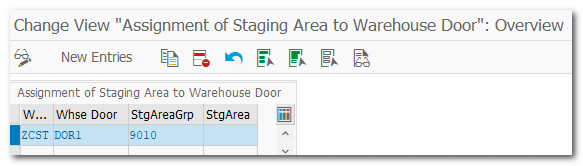
| Step 11. | Define Work Center Master Data |
| TCODE | /scwm/tworkst |
| Pre-requisite Step 8.1. |

| Step 12. | Assignment of Warehouse Door to SC Unit |
| TCODE | /SCWM/DOOR_SCU Assign Storage Bin Assign Supply Chain Unit |
- Assign inbound door BIN

- Assign Supply Chain Unit as Door
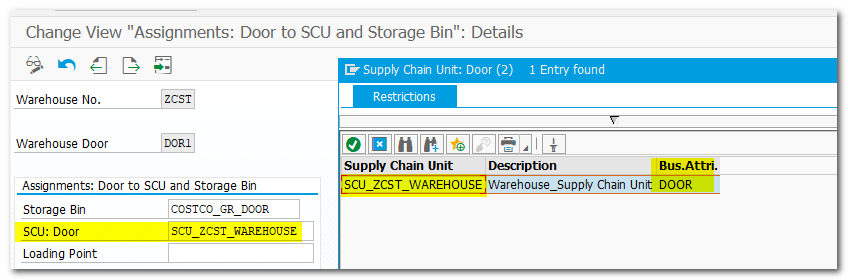
| Step 13. | Staging Area and Door Determ. (Inb.) |
| TCODE | /SCWM/STADET_IN |

| Step 13.1. | Access to Staging Area and Door Det. |
| TCODE | /SCWM/STADET_ASS |

| Step 14. | Define Process-Oriented Storage Control |
| IMG | SCM Extended Warehouse Management- EWM-Cross Process Settings-Warehouse Task-Define Process-Oriented Storage Control |
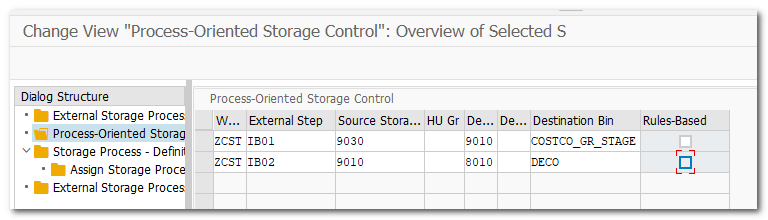
| Step 15. | Test POSC Scenario |
| ME21N VL31N /SCWM/PRDI | Created Purchase order #4500100239 Created Inbound Deliver #180000718 and distributed to the EWM Check Inbound delivery in EWM |
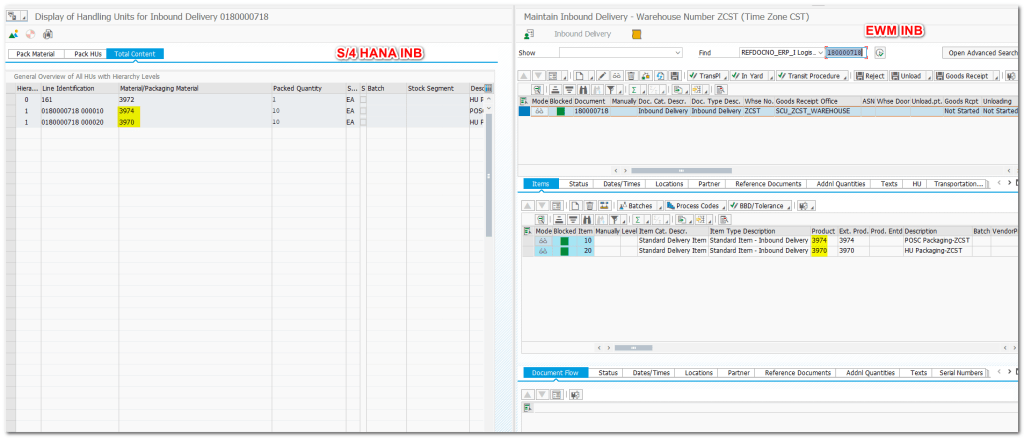
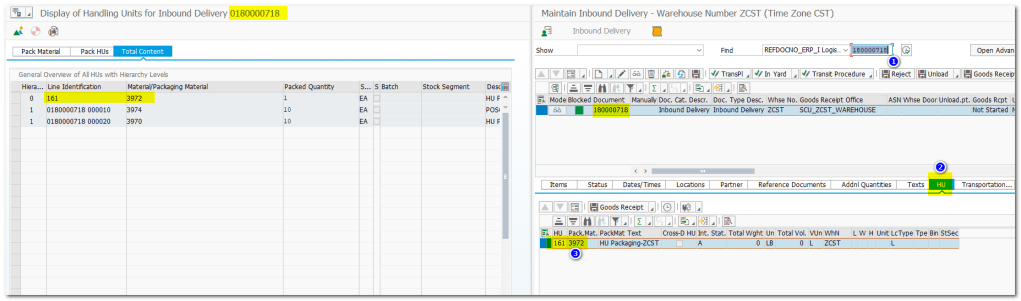
Create Warehouse Task
Handling Unit Tab
Create + Save


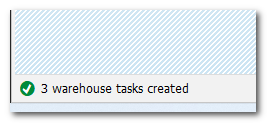
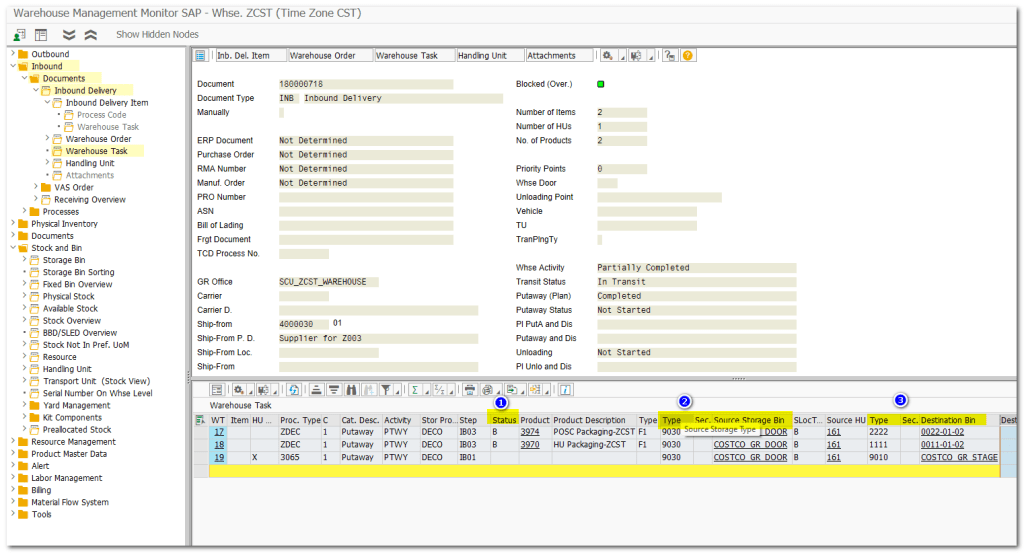
3 Warehouse Tasks are created, because this inbound delivery has warehouse process type as Deconsolidation (ZDEC) which goes through POSC process.
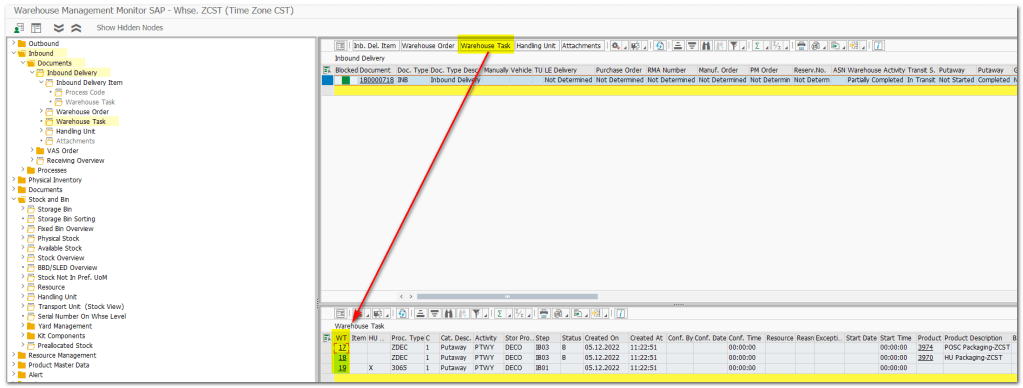
/N/SCWM/MON
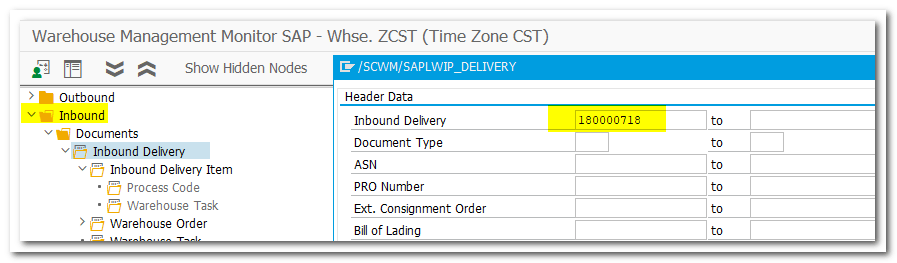
Click on Warehouse Task to see Tasks Created for Inbound Delivery
Task Status, Source Storage Type/BIN and Destination Storage Type/BIN
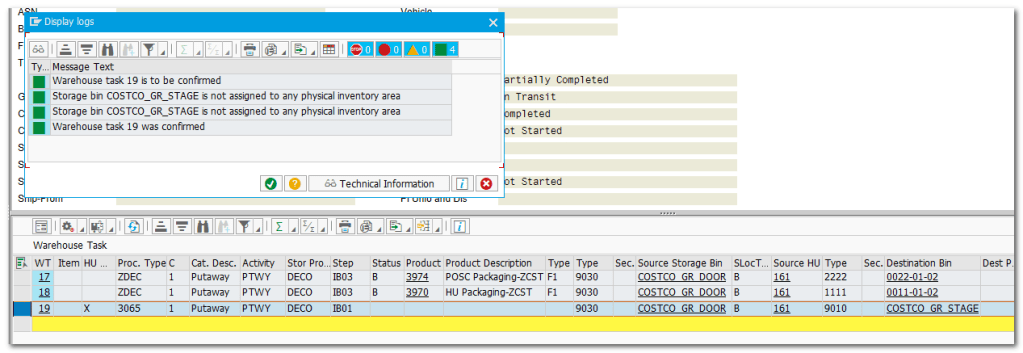
Selected Task #19 and confirmed Warehouse Task in background

Upon successfully execution of task, system will change status to “C” and created follow up Task
New Task Created for IB02 step (Staging to DECO)

Selected Task #21 and confirmed Warehouse Task in background

Next step for task 17 & 18, deconsolidate Handling Unit and Create New Handling Unit (One HU to Multiple HU)
Transaction: /n/scwm/dcons
Choose Defined WorkCentre for deconsolidation
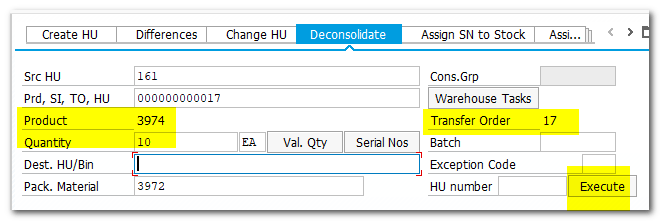
Execute
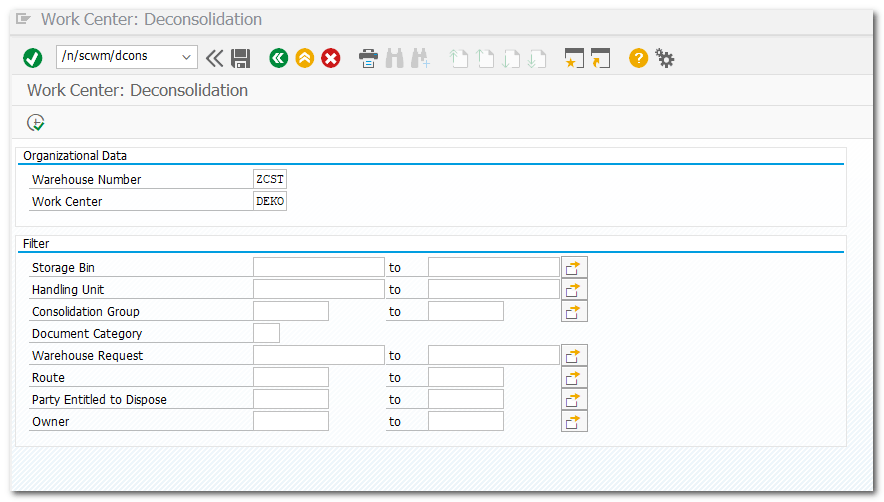
Deconsolidation Tab
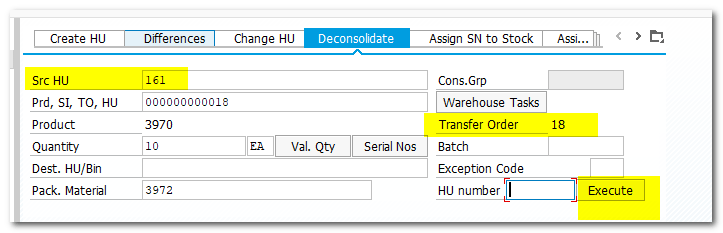
Provide Source HU #161
Provide Packaging Material #3972
Click on Warehouse Task to pull open WT
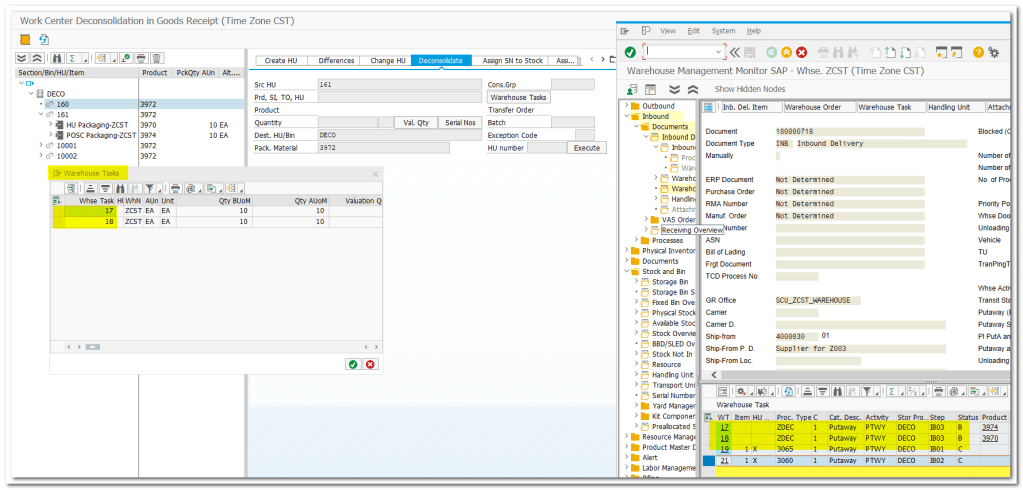

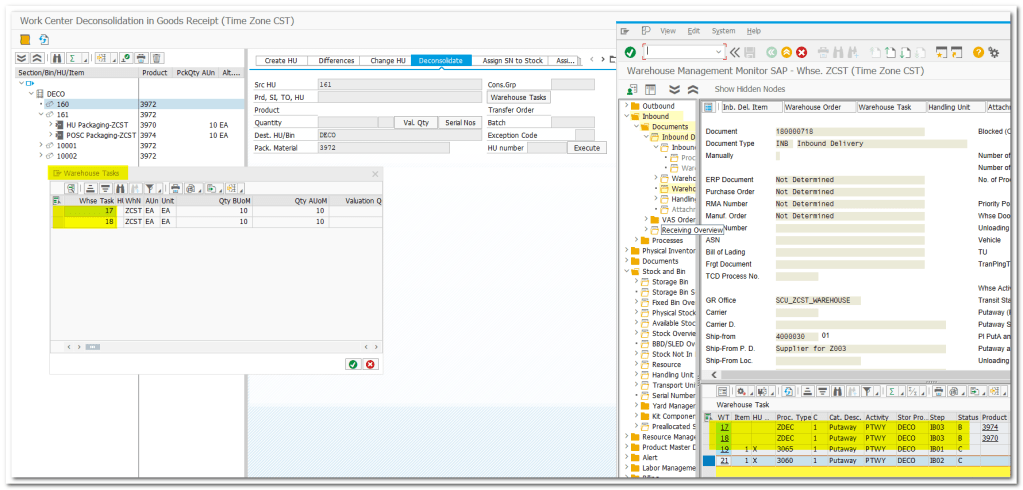
Select Task #17 and execute
Repeat same steps for Task #18
2 HUs created on EWM side(Repacking)
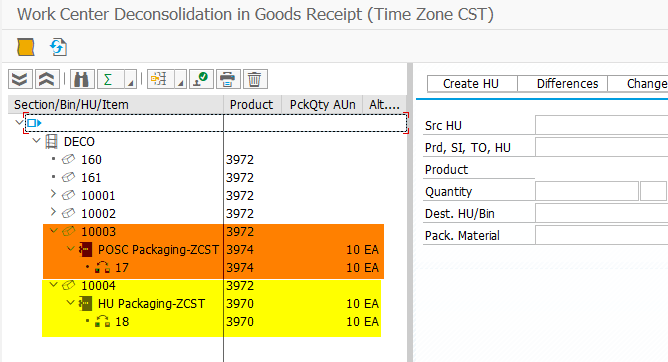
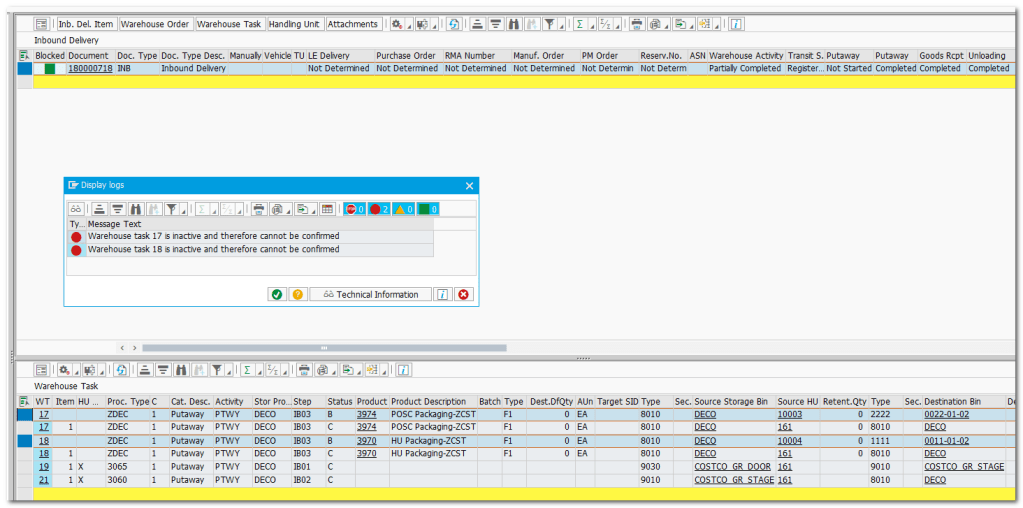
Task 17 and 18 is not active, because we didnt set Status to Complete
Set status to Complete

Select rows of Task #17 and #18 which has status Blank, confirm in background for final Putaway

Task 17 and 18 is complete

Status on Task changed from Blank to Complete

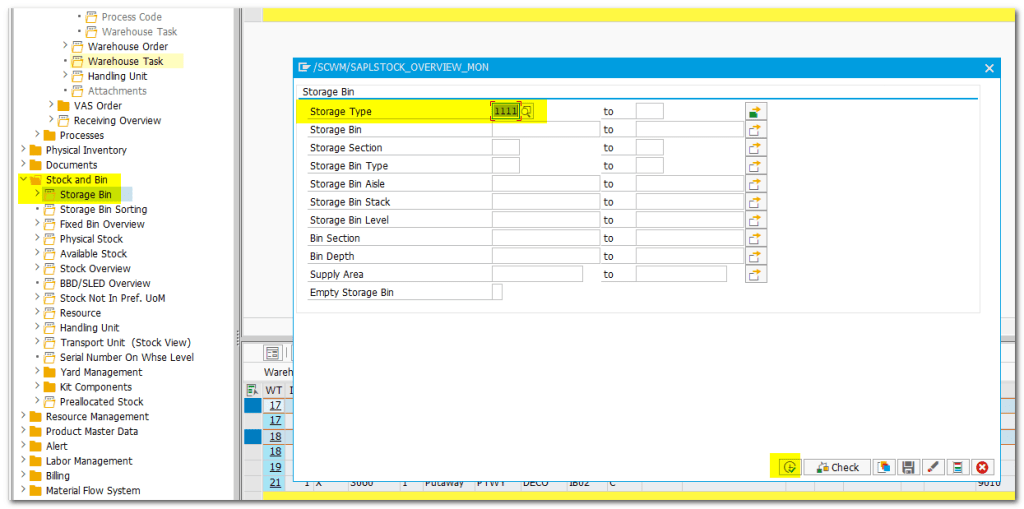
Go to Storage BIN folder
Provide Storage Type 1111 and 2222 and excute
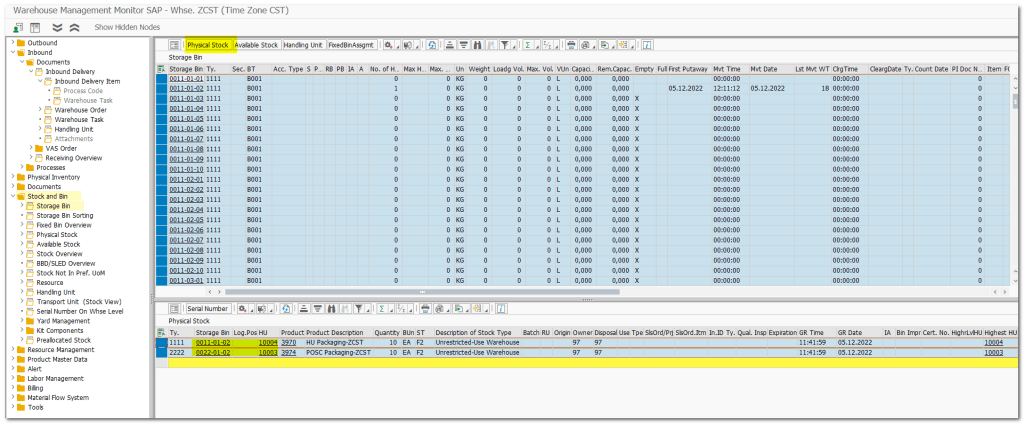
Check Physical Stock
Both newly created HU are in storage BINs
Final Status of Tasks

 SAP Quick Guide